
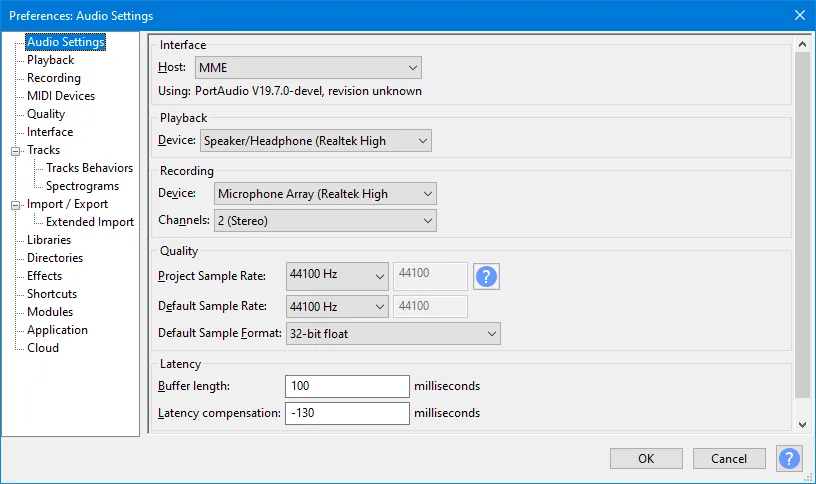
Why ASIO4ALL does not appear in standard Audacity
Audacity can be compiled with ASIO support, but the official downloadable builds do not include it. ASIO4ALL is an ASIO driver layer, so it can appear only when that particular Audacity build contains the ASIO backend. Reinstalling the driver cannot add a backend that is missing from the application.
If Audio Settings lists MME, Windows DirectSound, and Windows WASAPI but no ASIO, the standard build is behaving normally. This is different from a DAW that ships with ASIO support and can immediately list ASIO4ALL v2.
Choose MME, DirectSound, or Windows WASAPI
MME offers the broadest compatibility and is a practical first test for microphones, USB devices, and built-in audio. DirectSound also suits ordinary playback and recording. Windows WASAPI is usually the best alternative for a modern Windows path or loopback capture.
Select the host first, then choose matching recording and playback devices. Keep the Windows device format and Audacity project rate aligned. Start with one device family before combining separate clocks or Bluetooth hardware.
| Goal | Use first | ASIO boundary |
|---|---|---|
| Basic microphone recording | MME or WASAPI | ASIO only in a private build |
| Record computer playback | WASAPI loopback | ASIO4ALL is not required |
| Professional interface | Native interface driver | Prefer native ASIO |
| ASIO4ALL missing from Host | Expected in standard Audacity | Private build if essential |
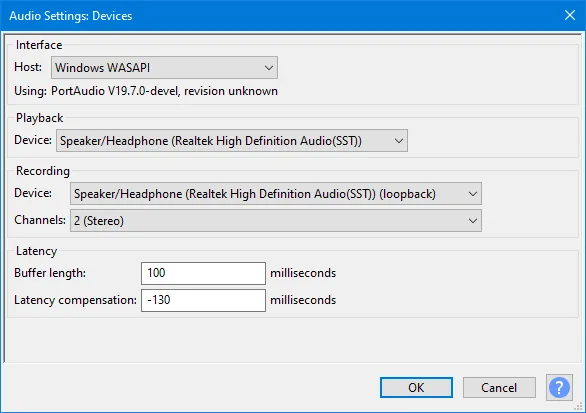
Record a microphone or Windows playback
For a microphone, choose MME or WASAPI, select the physical input, and make a short test while watching the input meter. If it stays silent, check Windows microphone privacy permissions and close applications that may hold the device.
For computer playback, choose Windows WASAPI and a recording device ending in loopback. Select its matching playback device, start the source audio, and record. The official Audacity manual documents this path; ASIO4ALL is not required.
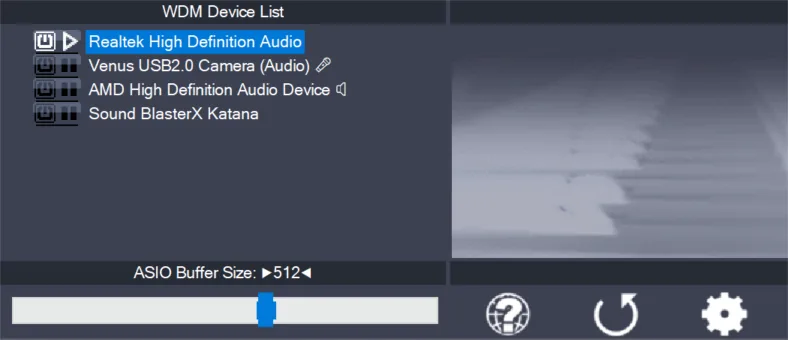
ASIO-enabled builds, troubleshooting, and version check
An ASIO-enabled Audacity build may expose ASIO4ALL or a hardware maker's native ASIO driver. Audacity's official support page now notes that ASIO was open-sourced in 2025, links an interim community build, and says native support is planned. This is still separate from the standard Audacity download and is not a normal plugin installation.
If ASIO4ALL works in another DAW but is absent from Audacity, the driver is not necessarily broken. Prefer a manufacturer's native ASIO driver for professional interfaces. The official ASIO4ALL source was rechecked on July 29, 2026: version 2.22 remains current, and the verified installer is 557,232 bytes.
Official references checked July 29, 2026: ASIO in Audacity · Audio Settings · Loopback · ASIO4ALL 2.22
Private ASIO builds, troubleshooting, and version check
A private ASIO-enabled build may expose ASIO4ALL or a hardware maker's native ASIO driver. This is a development task involving Audacity source code, a compatible Steinberg ASIO SDK, and the applicable licenses; it is not a normal plugin installation.
If ASIO4ALL works in another DAW but is absent from Audacity, the driver is not necessarily broken. Prefer a manufacturer's native ASIO driver for professional interfaces. The official ASIO4ALL source was rechecked on July 29, 2026: version 2.22 remains current, and the verified installer is 557,232 bytes.
- Basic microphone recording: MME or WASAPI
- Record computer playback: WASAPI loopback
- Professional interface: Native interface driver
- ASIO4ALL missing from Host: Expected in standard Audacity
ASIO4ALL Audacity FAQ
Can Audacity use ASIO4ALL?
Only an Audacity build with ASIO support can list ASIO4ALL. The official standard download does not, but Audacity now documents an interim community ASIO-enabled build.
Why is ASIO4ALL not showing?
The official build exposes MME, DirectSound, and WASAPI, not ASIO.
What should I use instead?
Start with MME for compatibility or Windows WASAPI for modern routing and loopback.
Is ASIO4ALL 2.22 current?
Yes. The official release and 557,232-byte installer were verified again on July 29, 2026.